ROS 2 meta-package with tools for working with prompted systems such as large language models and their responses in distributed robotic applications. It provides generic ROS message types for prompt, embedding, and tokenization workflows together with a flexible plugin-based bridge. The current providers are:
| Provider | Package |
|---|---|
| OpenAI | prompt_openai |
| Ollama | prompt_ollama |
Motivation
prompt_bridge is designed to provide a generic, extensible interface for integrating prompted systems (e.g., LLMs) into ROS 2 robotic applications. It follows ROS best practices by using a plugin architecture, allowing different LLM providers to be loaded at runtime. This enables rapid experimentation and integration of new models and providers without changing core code.
Features
- Plugin-based architecture: Easily add new LLM providers or prompt schemes via plugins.
- Unified ROS interfaces: Provides ROS services for prompt, embedding, and tokenization requests.
- Prompt history tracking: Publishes prompt/response history for monitoring and debugging.
- Chat and cache modes: Supports conversational (chat) and stateless prompt handling, with optional caching and flushing.
- Dynamic configuration: Model families and plugins are loaded at runtime from parameters or YAML config.
Prompt Bridge
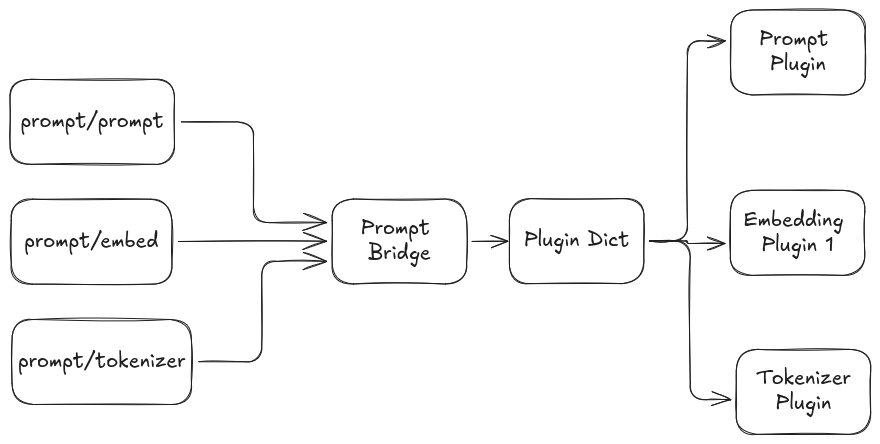
The main node that connects ROS 2 applications to prompt providers. It loads providers through pluginlib and exposes prompt, embedding, and tokenization services concurrently.
- Prompt Interfaces:
prompt/prompt(prompt_msgs/srv/Prompt)- Main entry point for sending prompts and receiving responses.
- Embedding Interfaces:
prompt/embedding(prompt_msgs/srv/Embedding)- Main entry point for requesting embedding vectors for text.
- Tokenization interfaces:
prompt/tokenizer(prompt_msgs/srv/Tokenize)- Main entry point for encoding text to tokens and decoding tokens back into text.
- History Publisher:
prompt/history(prompt_msgs/msg/PromptHistory)- Publishes a rolling history of prompt transactions.
Following is the current system Architecture
Read more about,
- Prompt Interface to understand about Prompting Sub System
- Embed Interface to understand about Embedding Sub System
- Tokenize Interface to understand about PromptTokenizer Sub System
- Class Inheritance to understand how to inherit when creating new plugins
- Plugin parameters to understand how to configure new and existing plugins to change behaviour
Install
Clone packages
Clone the prompt tools package
Initialize submodules
Dependency Installation
Move to workspace root and run the following command to install dependencies
API Keys
Using Proxy LLM
If not connecting to a Online API, a local LLM running on docker can be used. Separately clone a repository such as CollaborativeRoboticsLab/ollama-docker for this purpose and start it.
Using OpenAI API
Run the following command with the actual OPENAI_API_KEY in place of <open-ai-api-key> if using prompt-openai plugins
Then build the workspace and launch prompt_bridge with the packaged YAML configuration. The default OpenAI configuration uses the Responses API for prompts and the Embeddings API for embeddings.
Using the devcontainer
Rename the .devcontainer/devcontainer-empty.env as .devcontainer/devcontainer.env and update it with your API Keys. Then rebuild the container
Usage
Starting the Prompt Bridge
Testing
To build and run the C++ test node that exercises the current prompt, chat, cache, and embedding flows:
This will run the test node and print results for stateless prompting, chat mode, cached prompting, and embedding requests.
Python Examples
Two lightweight Python examples are available under prompt_bridge/test/:
call_srvs.pysends a single request toprompt/prompt.call_services.pyexercisesprompt/prompt,prompt/embedding, andprompt/tokenizer.
Run them from a sourced workspace after prompt_bridge is already running:
Current Defaults
- Prompt service:
prompt/prompt - Embedding service:
prompt/embedding - Tokenizer service:
prompt/tokenizer - History topic:
prompt/history - Default config:
prompt_bridge/config/prompt_bridge.yaml
OpenAI prompt requests are sent to https://api.openai.com/v1/responses, OpenAI embedding requests are sent to https://api.openai.com/v1/embeddings, and OpenAI tokenization is handled locally through cpp-tiktoken.
Citation
If you use this work in an academic context, please cite the following publication(s):