Embedding Service Interface
The embedding service interface is prompt/embedding, using the Embedding.srv definition. prompt_bridge selects the embedding provider from input.model_family and forwards the request to the matching plugin.
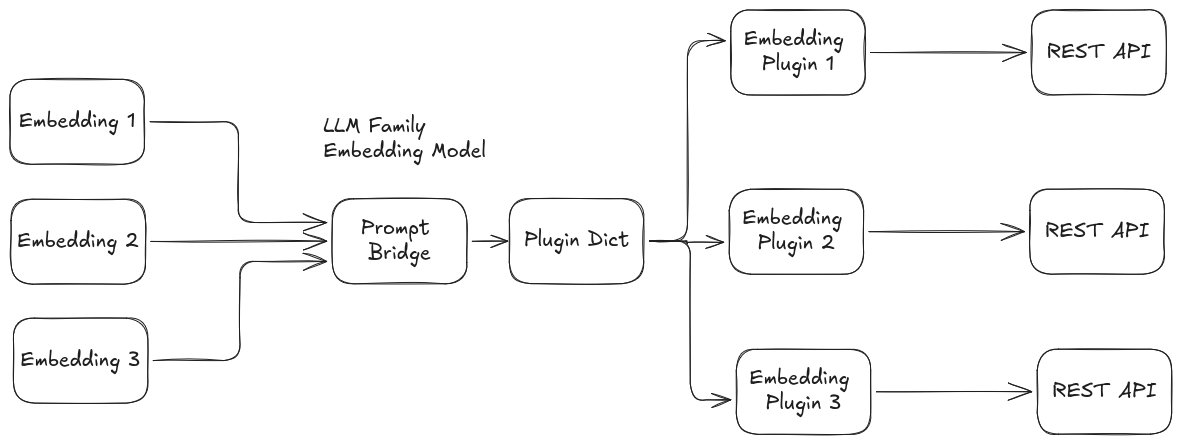
Embedding Architecture
Service Definition
prompt_msgs/Embed input
---
prompt_msgs/EmbedResponse output
Request Fields
| Field | Type | Description |
|---|---|---|
input | Embed | The embedding request message. |
Embed.msg Fields
| Field | Type | Description |
|---|---|---|
text | string | The input text to embed. |
model_family | string | Model family/provider to use (e.g., openai). |
options | ModelOption[] | Model-specific options. |
Response Fields
| Field | Type | Description |
|---|---|---|
output | EmbedResponse | The embedding response. |
EmbedResponse.msg Fields
| Field | Type | Description |
|---|---|---|
embeddings | Embedding[] | List of embeddings. |
success | bool | True if embedding was successful. |
error | string | Error message if failed. |
model | string | Model used. |
prompt_tokens | int64 | Number of prompt tokens used. |
total_tokens | int64 | Total tokens used. |
Embedding.msg Fields
| Field | Type | Description |
|---|---|---|
float_embedding | float32[] | Embedding as float array (if is_float true). |
base64_embedding | string | Embedding as base64 string (if is_float false). |
is_float | bool | True if float, false if base64. |
index | int64 | Index of the embedding. |
ModelOption.msg Fields
| Field | Type | Description |
|---|---|---|
key | string | Option key |
value | string | Option value |
type | string | Type hint. The message constants currently define str, bool, int, and real. |
How to Use the Service
- Set
textto the string you want to embed. - Set
model_familyto the provider/plugin (e.g.,openai,ollama). - Use
optionsfor model-specific parameters (see plugin_parameters.md).
Example Request (YAML)
input:
text: "The quick brown fox jumps over the lazy dog."
model_family: "openai"
options:
- key: model
value: text-embedding-3-small
type: str
- key: dimensions
value: "1536"
type: int
- key: encoding_format
value: float
type: str
Extending
To add a new Online Embedding provider, implement a plugin inheriting from prompt::EmbedBaseClass and register it. Add its configuration to your YAML file and list it in embedding_family_names and embedding_family_plugins.
Notes
- The OpenAI embedding plugin returns either
float_embeddingorbase64_embeddingfor each item depending onencoding_format. - The service can return more than one embedding item if the provider returns multiple entries in the
dataarray. - Use the
successanderrorfields to check for errors.